


What Is Technical SEO? A Complete Guide to Website Optimization
Technical SEO helps search engines discover, crawl, understand, and index your website correctly. If you want to learn what technical SEO is, how it works, and how to improve your website's technical health, this guide explains the important concepts with practical examples.
Imagine you have created a beautiful website with useful blogs, attractive images, and well-written service pages. However, Google cannot access important pages, your website loads slowly on mobile, or your sitemap contains incorrect URLs. In that situation, your content may struggle to reach its full search visibility potential.
This is where technical SEO becomes important.
In this guide, we will cover website crawling, indexing, XML sitemaps, robots.txt, canonical tags, HTTPS, Core Web Vitals, mobile usability, structured data, and common technical SEO problems. You will also learn how to check your website and identify issues that need attention.
What Is Technical SEO?
Technical SEO is the process of improving a website's technical structure so search engines can access, crawl, understand, and potentially index its important pages. It also includes improvements that support website performance, security, usability, and reliable content delivery.
Unlike on-page SEO, which focuses on elements such as headings, content, keywords, and internal links, technical SEO focuses on the systems and website elements that help those pages function properly.
For example, consider a blog that answers an important question about digital marketing. If the page accidentally contains a noindex directive, Google may exclude it from search results. The content might be excellent, but the technical configuration is working against its visibility.
Technical SEO helps you identify and fix problems like this before they unnecessarily limit your website's potential.
Why Is Technical SEO Important for Your Website?
A website needs more than quality content to perform well in organic search. Search engines must be able to access its pages, process their content, and determine which URLs may be eligible to appear in results.
How Does Technical SEO Work?
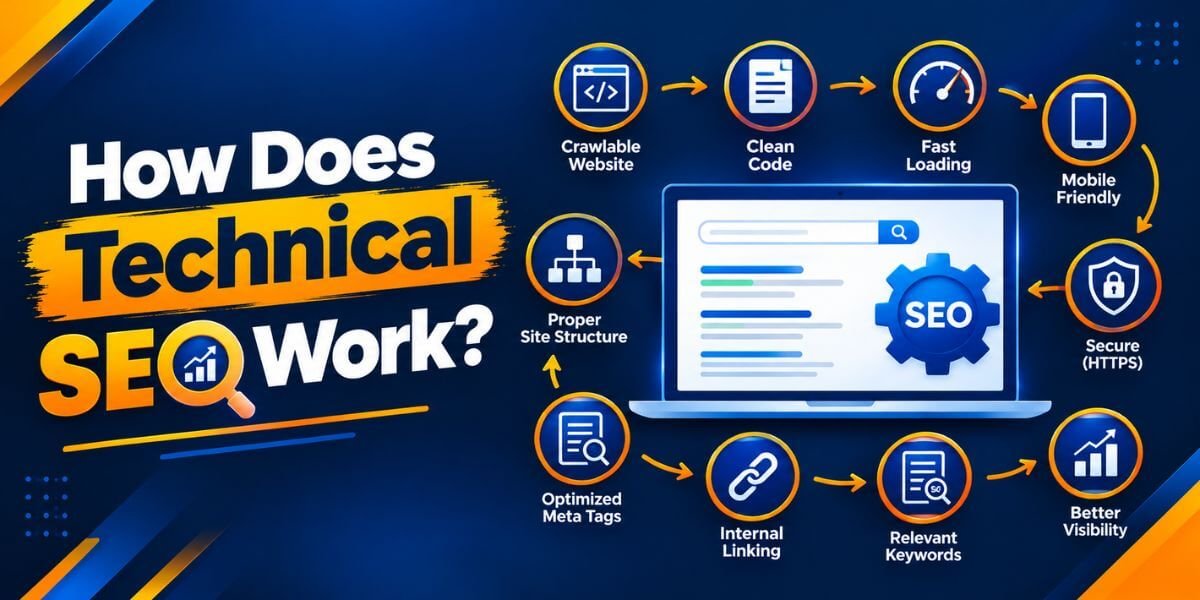
1. Crawling
Crawling is the process through which search engine crawlers discover and access web pages. Google uses automated software, including Googlebot, to explore URLs and retrieve their content.
Crawling can be affected by broken links, server errors, blocked resources, and incorrect robots.txt rules.
Practical example: You publish a new blog but do not link to it from any other page on your website. Google may have difficulty discovering it, particularly if no sitemap or other discoverable link points to it.
2. Indexing
After crawling a page, Google may analyze its content and other signals to determine whether and how it should be included in its search index.
A page can be crawled without being indexed. Duplicate content, a noindex directive, inaccessible content, or other quality and technical factors can affect indexing.
Practical example: Your new blog appears in the URL Inspection tool as crawled but not indexed. You should investigate the page's quality, canonical selection, internal links, and indexing directives rather than repeatedly requesting indexing without fixing the underlying issue.
3. Serving Search Results
When someone searches for information, Google selects and displays results that its systems consider relevant and useful.
Even an indexed page may not rank prominently for a competitive query. Search intent, content usefulness, relevance, and many other factors influence its performance.
The key lesson: Technical SEO helps search engines access and process your content correctly. Useful content and broader SEO efforts help you compete for visibility.
15 Important Technical SEO Factors You Should Check

1. Website Crawling and Accessibility
2. XML Sitemap Optimization
An XML sitemap lists URLs that you want search engines to discover. It is particularly useful for new websites, large websites, and sites with frequently updated content.
For a WordPress website, an SEO plugin such as Rank Math or Yoast SEO can generate an XML sitemap automatically.
Open your sitemap and check that your latest blog posts appear where expected. Then submit the sitemap through Google Search Console.
Submitting a sitemap helps Google discover URLs, but it does not guarantee that every URL will be indexed.
3. Robots.txt Configuration
he robots.txt file provides instructions to crawlers about which parts of a website they may access.
A misconfigured file can accidentally block important pages or resources.
For example, a rule that blocks an important content directory could prevent Googlebot from crawling pages in that directory.
Check your robots.txt file at:
https://yourdomain.com/robots.txt
Replace yourdomain.com with your actual domain.
Do not use robots.txt as a substitute for noindex. Blocking crawling does not reliably remove a URL from search results. If you need a page excluded from indexing, use an appropriate indexing directive and make sure the crawler can access the page to see it.
4. Website Indexing and Noindex Tags
Indexing is one of the most important areas of technical SEO because it determines whether a page can be included in Google's search index.
In Google Search Console, open URL Inspection and review the indexing information for your page.
If a page is not indexed, identify the actual reason first. A successful live test does not guarantee that Google will index the page later.
5. Canonical Tags and Duplicate URLs
Websites can sometimes expose the same or similar content through multiple URLs. For example, tracking parameters or alternative URL versions may create duplicate-looking pages.
A canonical tag tells search engines which URL is preferred among duplicate or similar pages.
Example:
<link rel="canonical" href="https://example.com/technical-seo-guide/" />
The example shows the preferred URL in the page's HTML. Replace the example URL with the correct canonical URL for your page.
Use canonical tags carefully. The canonical URL should contain equivalent or substantially similar content, and internal links and sitemaps should generally support the same preferred URL.
A canonical tag is a signal, not an absolute command. Google may select a different canonical URL if other signals suggest that another page is more appropriate.
6. HTTPS and Website Security
HTTPS encrypts the connection between your website and its visitors. It helps protect information transmitted through contact forms, login pages, and other website interactions.
For WordPress websites, confirm that the WordPress Address and Site Address use the intended HTTPS version.
HTTPS is an important security and website quality practice, but installing an SSL certificate alone will not make a website rank higher automatically.
7. Core Web Vitals and Page Speed
These thresholds are assessed at the 75th percentile of page visits, separately for mobile and desktop.
Use Google PageSpeed Insights to review performance data and identify opportunities to improve loading and responsiveness.
Practical improvements may include compressing images, reducing unnecessary scripts, enabling appropriate caching, improving server response time, and removing unused code.
Do not install multiple speed plugins without testing their effects. Conflicting settings can create new issues rather than improve performance.
8. Mobile-Friendly Website Design
Many visitors discover websites through mobile devices. Your website should be easy to read, navigate, and use on smaller screens.
Google primarily uses the mobile version of website content for indexing. Therefore, hiding important text or links on mobile can affect how Google understands your page.
Test your website on an actual phone, not just a desktop browser resized to a smaller width.
9. Website Architecture and URL Structure
A clear website architecture helps visitors and search engines navigate your content.
These are illustrative URLs, not a requirement to restructure an existing website.
Use descriptive, readable URLs and group related content logically. Avoid changing established URLs without a clear reason because URL changes can require redirects and may temporarily affect search visibility.
10. Internal Linking and Orphan Pages
Internal links connect pages within your website. They help visitors find related information and give search engines additional paths for discovering content.
An orphan page is a page that has no meaningful internal links pointing to it.
For example, a technical SEO article could link to your guides on Google Search Console, website indexing, and on-page SEO.
Internal linking should be useful and natural. Do not add links solely to repeat keywords.
11. Structured Data and Schema Markup
Structured data provides search engines with additional information about a page using a standardized format, often JSON-LD.
The structured data must accurately represent the visible content on the page and follow the relevant search engine guidelines.
Schema markup can make a page eligible for certain search result enhancements, but it does not guarantee rich results or higher rankings. There is also no special schema markup required specifically to appear in Google AI Overviews.
12. Broken Links and Redirect Management
A broken link can lead visitors to a page that no longer exists or cannot be accessed.
Use a relevant crawler or link-checking tool to identify problems. Update internal links to point directly to the correct destination wherever possible.
Use a permanent redirect, typically HTTP 301 or 308, when a page has genuinely moved permanently. Redirect to the most relevant replacement page rather than sending every removed URL to the homepage.
Not every 404 error is harmful. If a page has been intentionally removed and has no suitable replacement, returning a proper 404 or 410 status can be appropriate.
13. Image Optimization
Large, unoptimized images can slow down a website and make pages harder to use, especially on mobile connections.
Avoid lazy-loading the main image that is needed for the initial page display if doing so delays its loading.
Alt text should explain an image's purpose or content, not contain repeated SEO keywords.
14. JavaScript Rendering and Crawlability
Some websites use JavaScript to display content, navigation, product information, or other important elements.
Google can render JavaScript, but rendering can involve additional processing. Some implementations also make it difficult for search engines to access important content or links.
For complex websites or JavaScript-heavy applications, use URL Inspection and rendered-page testing to investigate what Google can see.
15. Pagination, Hreflang, and International SEO
Larger websites may need additional technical controls.
Pagination: Category pages, archives, and long lists may be split across multiple URLs. Ensure that important items remain discoverable through crawlable links.
Hreflang: Websites serving different language or regional versions can use hreflang annotations to help search engines understand the intended audience for each version. The URLs and language or region codes must be correct, with appropriate reciprocal annotations.
International URL structure: Depending on the website, separate country-specific domains, subdomains, or subdirectories may be suitable. Choose a structure you can maintain accurately.
These features are not necessary for every website. Implement them when your site's size, content structure, or international audience requires them.
How to Do a Technical SEO Audit Step by Step

A technical SEO audit helps you identify problems, understand their impact, and prioritize fixes instead of making random changes.
Step 1: Set Up Google Search Console
Verify your website in Google Search Console and review its indexing, sitemap, and performance information.
Start with the Page Indexing report and inspect a few important URLs. Identify whether the pages are indexed, excluded, redirected, or affected by other issues.
Step 2: Check Your XML Sitemap
Open your sitemap and confirm that it contains your important, preferred URLs.
Check whether newly published posts are included and whether the sitemap reports errors in Search Console.
If a new post is missing, investigate your SEO plugin settings, sitemap configuration, publication status, and any relevant cache before assuming that Google has a problem.
Step 3: Test Important Pages
Use URL Inspection for your homepage, main service pages, important blogs, and newly published content.
Review the indexed version and, when necessary, run a live test to check whether Google can currently access the page.
Remember that live testing and indexing are different things.
Step 4: Test Website Performance
Run key URLs through PageSpeed Insights on mobile and desktop.
Record the most significant issues, such as oversized images, slow server responses, render-blocking resources, or excessive JavaScript.
Prioritize fixes that improve actual user experience instead of chasing a perfect score at any cost.
Step 5: Crawl Your Website
Use a website crawler to find broken internal links, redirect chains, missing titles, duplicate metadata, canonical inconsistencies, and orphan pages.
For a small website, you can start with important pages and expand the audit as needed.
Step 6: Review Security and Mobile Usability
Step 7: Fix Issues in Priority Order
After making changes, monitor the relevant reports and retest the affected URLs. Some changes take time to be reflected in Google's systems.
Best Technical SEO Tools for Beginners

You do not need to purchase every SEO tool to start a technical audit.
Google Search Console: Helps you monitor indexing, sitemap processing, search performance, and selected technical issues.
Google PageSpeed Insights: Provides performance diagnostics and Core Web Vitals information when field data is available.
Google Rich Results Test: Checks eligibility for supported rich result features and validates certain structured data implementations.
Screaming Frog SEO Spider: Crawls websites to identify technical and on-page issues. Its free version is useful for smaller audits, subject to its current limits.
Rank Math or Yoast SEO: WordPress plugins that can assist with XML sitemaps, canonical tags, metadata, and selected schema settings. They do not automatically solve every technical SEO problem.
Use tools to identify issues, but verify findings before changing your website. A warning does not always indicate a serious problem, and automated recommendations do not replace sound technical judgement.
Technical SEO for WordPress Websites
If you use WordPress, you can handle many routine technical SEO tasks through your dashboard and hosting configuration.
Be careful when editing robots.txt, modifying theme files, or installing multiple plugins that perform overlapping optimization tasks. Keep a backup and test significant changes before applying them across your website.
How Technical SEO Supports AIO, AEO, and GEO
Modern search includes traditional results and AI-assisted experiences. This makes clear website structure and reliable content discovery increasingly useful.
AI Overviews (AIO): Your page needs to be eligible for Google Search and provide useful, relevant information. Technical accessibility and indexing are part of that foundation.
Answer Engine Optimization (AEO): Clear headings, direct answers, accurate explanations, and well-organized content can help people find answers. Technical SEO ensures the content can be accessed and processed appropriately.
Generative Engine Optimization (GEO): Unique, reliable, experience-informed content and sound technical foundations can support discoverability across generative search experiences.
Google's guidance is clear that existing SEO best practices remain relevant to AI features in Search. There is no guaranteed AI ranking trick, and adding a special AI file or schema does not guarantee inclusion.
For a digital marketing website, the practical approach is to maintain accessible pages, create genuinely helpful content, use meaningful internal links, and monitor performance in the tools available to you.
Common Technical SEO Mistakes to Avoid
A good technical SEO process is based on diagnosis, prioritization, implementation, and measurement—not on installing plugins and hoping for better rankings.
Final Thoughts
Technical SEO is an essential part of building and maintaining a search-friendly website. It helps search engines access your pages, understand your website structure, and evaluate content that may be eligible for search visibility.
Start with the basics: crawling, indexing, XML sitemaps, robots.txt, canonical tags, HTTPS, internal linking, and Core Web Vitals. Once these foundations are working correctly, investigate more advanced areas such as JavaScript rendering, structured data, and international SEO when they are relevant to your website.
At KishorDigital Academy, the goal is to understand why an SEO task matters and how to implement it on a real website. Learning to diagnose technical problems is more valuable than blindly following a checklist.
With consistent monitoring, useful content, and practical improvements, you can build a stronger foundation for long-term organic search performance.
Whether you need more leads, better online visibility or a complete digital marketing solution, our team is here to understand your goals and suggest the right approach for your business. Get in touch with KishorDigital today and let’s turn your digital goals into measurable results.